FEWDRemote
Lecture 15: Object Literals and Document Object Model
-
Welcome to lecture 15! Here’s a brief class breakdown.

-
Learning Objectives
- Use Object literals for solving problems in javascript
- Identify the differences between the
DOMandHTML - Modify the
DOMusing vanilla JavaScript - Register and trigger event handlers
-
Agenda
- Object literal basics
- Introduction to the Document Object Model (referred to as the DOM)
- DOM Manipulation with Vanilla JS
- Introduction to jQuery
Object Literal Basics
Let’s discuss the mechanics of how object literals are created and used. Then, let’s use them to build something useful.
-
Object Literals are another type of data structure, or method for storing and retrieving data.
- We are already intimately familiar with one type of data structure, arrays.
- Object literals are essentially dictionaries, or associative arrays.
- With arrays, we use the index, a number, as a way to store and retrieve information.
- With object literals, we use the key, a string, as a way to store and retrieve information.
-
SIDE NOTE
So actually, the computer science term for dictionaries/object literals/etc is called the hash map.
Hash maps have a hashing function and an internal array for storing data. Given a key and value pair that we wish to store, the hash map converts the key into an index for the array using the hashing function and stores the value at the calculated index.
-
Creating Objects
// empty object literal
const myObj = {};

// object with prefilled values
const myObj2 = {
    "property1": "value1",  // notice the colon!
    "property2": 2, // notice the comma!
}

// updating an object after the fact
myObj2["property3"] = true;
Note that updating an object literal is not the same a redefining it. This is why we are able to mutate our const object without errors.
-
Objects are just another type of valid javascript datatype. Question:
//  what do you expect to see?
console.log(typeof myObj2);

 // what do you expect to see?
console.log(typeof myObj2["property1"]);

// how about now?
console.log(typeof myObj2["thisPropertyDoesntExistTho"]);
-
A note about syntax:
myObj2.foobar = 'baz';

const myObj3 = {
    test: 1,
}

console.log(myObj3.test)
Sometimes you will see object properties being referenced and defined in the manner above.
👇👇👇
-
Generally, this is usually ok however if you want to store an object property that has invalid javascript characters such as spaces or dashes you must use the approached defined initially.
-
Dynamically setting / retrieving values
Consider the following:
const o = {
	"test": 1,
}

const key = "test";
console.log(o[key]); //  what should this give us?
const key = "foo";
const o = {
	[key]: 'val',
}
console.log(o); // what key is stored in o?
Keep this technique in mind, it will come in handy when we write more complex code.
-
Methods
Object properties that are type function are called methods. (Just a fancy word for a function that is the property of an object).
👇👇👇
-
Here’s how we can get/set methods
const human = {
    'name': 'Taq Karim',
    speak(catchphrase) {
		    return "Hi, my name is " +
				human.name +
				'. ' +
				catchphrase;
		}
}

console.log(human.speak('BOOM. We chillin'));
-
Generically, we can define methods as follows:
const obj = {
	method() {
		// this is preferred
	},
	// or
	method2: function() {

	},
	// or
	method3: () => {

	}
}
-
Example of object usecase
const htmlNode = {
	tagName: 'div',
	attributes: {
		'data-test': '1',
		'id': 'LOL-dont-try-this-at-home',
		'class': 'foo bar',
	},
	getAttribute(name) {
		return htmlNode.attributes[name];
	},
	setAttribute(name, value) {
		htmlNode.attributes[name] = value;
	},
	classList: {
		add(name) {
			const currClass = htmlNode.getAttribute('class').split(' ');
			currClass.push(name);
			htmlNode.setAttribute('class', currClass.join(' '))
		}
	},
}
- this is a representation in javascript of an HTML DOM element
-
Primarily, this is the major usecase for objects. Think of it as a way to represent a real world thing in terms of code. Object literals are the simplest way to achieve that.
In a future lecture we will consider classes and how we can standardize this concept and make it more reusable.
-
Minimally, however, we can think of object literals as a way to namespace a bunch of similar datatypes. For instance, if we wanted to store some properties of a cat…
-
const belle = {
	fullName: 'Annabelle Lee',
	age: 12,
	isFluffy: true,
	speak() {
		return 'meow'
	}
}
In this case we have associated what would have been a few generic variable names under the belle namespace. This way, we are no longer in danger of scope collision.
-
Example of object usecase
Consider the following function.
- What does it do?
const validatePlayerChoice = player => {
	const lp = player.toLowerCase();
	const c = lp.substring(0,1);
	if (c !== "r" && c !== "p" && c !== "s") {
		throw new Error("INVALID INPUT: player " + c)
	}
	return c;
}
-
With comments now…
const validatePlayerChoice = (player) => {
	// remove bias for case insensitivity
	const lp = player.toLowerCase();

	// remove bias for misspelled choices
	const c = lp.substring(0,1);

	if (c !== "r" && c !== "p" && c !== "s") {
		throw new Error("INVALID INPUT: player " + c)
	}

	// if we are here, then player is VALID and it is either
	// "r", "p", "s"
	return c;
}
-
Suppose we created an object as follows:
const validPlayerChoices = {
	'r': true,
	'p': true,
	's': true,
}
How could we use this object to make our player validation logic easier?
👇👇👇
-
const validPlayerChoices = {'r': true, 'p': true, 's': true,}

const validatePlayerChoice = (player) => {
	// remove bias for case insensitivity
	const lp = player.toLowerCase();
	// remove bias for misspelled choices
	const c = lp.substring(0,1);
	if (typeof validPlayerChoices[c] === "undefined") {
		throw new Error("INVALID INPUT: player " + c)
	}
	// if we are here, then player is VALID and it is either
	// "r", "p", "s"
	return c;
}
What are some benefits to this approach?
-
PSET
In Samantha, implement the first two functions:
- getSuperHero
- updateSuperHero
Work in groups of 2, 10 minutes
Introduction to the DOM
-
Now that we have a decent grasp of the fundamentals of Javascript and programming, we are able to explore how we can apply these skills towards building interactive user interfaces.
-
Document Object Model (DOM)
The DOM is a programming interface for HTML. It’s a representation in JavaScript of the structure and content of an HTML tree.
-
(DOM Tree)
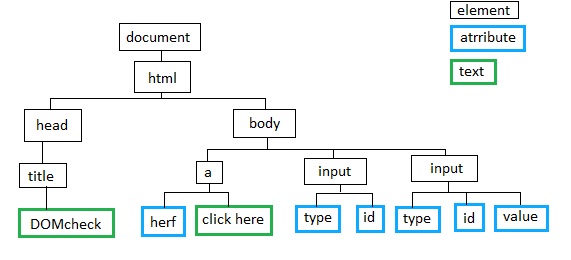
-
…but what is the DOM Tree tho?
-
Essentially, there are algorithms that walk through a piece of HTML content and parse the tags, attributes, etc into a javascript object that represents that piece of HTML code.
-
Since we now have a variable that “represents” the HTML code, we are able to use javascript freely - and all the techniques we have learned for object manipulation and usage - to query and manipulate our HTML.
-
In the browser, there is a built in document object that will also register our changes to the DOM object and make appropriate updates to the browser window itself.
-
In short, thanks to the DOM we can use JavaScript to change text, styling, add and remove elements, make elements clickable, etc.
-
It’s worth noting that the document object is ONLY available in the browser environment, but there are plenty of NodeJS libraries that will try to approximate this browser specific behavior (but they are not perfect).
-
Inspecting the DOM using Chrome’s console
-
Go to http://www.nytimes.com/. Open the developer tools in Chrome and navigate to the Console tab
-
- Type
documentinto the console and hit enter - Type
document.into the console and scroll through the autocomplete suggestions - Type
document.headinto the console and hit enter - Type
document.bodyinto the console and hit enter - Type
document.scriptsinto the console and hit enter - Type
document.styleSheetsinto the console and hit enter
-
Running JavaScript in the Browser
-
There are several ways to do this, the most proper approach is to use the script tag
<script src="./path/to/js/folder"></script>
This goes on the bottom of your HTML code, right before the closing <body> tag
-
Core JavaScript, DOM API, Third-party Libraries
-
We can divide the JavaScript we write into three categories:
- Core JavaScript
- DOM API
- Third-party libraries
-
Core JavaScript
-
Core JavaScript consists of our data types, control structures, the standard library, etc. This is what we get for free when we run JavaScript anywhere***, *e.g. our browser, Node, etc.
(NOTE: The standard library includes things like the Math and Date objects.)
-
DOM API
-
The DOM API includes DOM objects like document and their associated methods,
.getElementById(),getComputedStyle(), etc.
We get the DOM API for free when we run JavaScript in a web browser.
-
Third-Party Libraries
-
This is any JavaScript that’s included as an extra file, e.g. jQuery, React, Angular, etc. We have to include the file for the library to use it.
-
When we refer to vanilla JavaScript, it’s everything but third-party libraries, e.g. jQuery. Vanilla JavaScript is the DOM API and core JavaScript.
-
Anything that we do with a third-party library, we can do using vanilla JavaScript; we just have to write it. There will always be tradeoffs between our JavaScript file sizes, how much time we spend implementing some functionality, etc.
DOM Manipulation
-
Let’s modify the DOM together using vanilla JavaScript.
-
Create New Project Folder
-
Let’s make a test folder
-
- Create a folder called test.
- Inside your test folder, add a styles subfolder and a js subfolder
- Create one empty file, app.css inside your styles folder
- Create one empty file, app.js inside your js folder
- Create an index.html and link your css and js correctly to the code.
-
How can we test to ensure that the files are being loaded correctly?
-
Retrieving Elements using Vanilla JavaScript
-
We have many ways in vanilla JavaScript to retrieve elements that are on the page.
-
By retrieve, we mean get a reference to the element. Once we have a reference to an element, we can manipulate it, e.g. change its text, styling, children, etc.
-
document.getElementById()
<ul>
    <li id="first">Eggs</li>
    <li id="second">Milk</li>
</ul>
const firstListItem = document.getElementById('first');
console.log(firstListItem);
//=> shows first li element with the id "first"
-
It’s a very old way to retrieve an element; there are similar old methods, e.g. .getElementsByClassName() and .getElementsByTagName(). We won’t use some because we have something better!
-
document.querySelector()
document.querySelector() retrieves the first element that matches the CSS selector string
<ul>
    <li class="test">Eggs</li>
    <li class="test">Milk</li>
</ul>
const firstListItem = document. querySelector('.test');
console.log(firstListItem);
//=> shows first li element with the class "first"
Notice in the code above that the second li was not retrieved.
-
document.querySelectorAll()
document.querySelectorAll() returns a list of all elements that match a CSS selector string
<ul>
    <li class="test">Eggs</li>
    <li class="test">Milk</li>
</ul>
const listItems = document. querySelectorAll('.test');
console.log(listItems);
//=> shows all li elements with the class "first"
-
The result above is an array-like object, but not an array. Technically, it’s a Nodelist.
-
Exercise
Consider this repo. Download and open the jQuery_review folder. Complete the selectorsReview.js file (in js subfolder)
It asks to do in jQuery but attempt to use vanilla javascript only. Later on in lecture we will solve again with jQuery.
jQuery
-
Everything we just did using vanilla JavaScript, we can also do using jQuery, a third-party library.
There’s a good chance our syntax would have been less verbose and marginally easier to remember.
-
…Why did we just cover vanilla JavaScript?
-
It’s important to realize that jQuery uses vanilla JavaScript and is written using vanilla JavaScript.
-
You might not always have access to or be able to use jQuery. For example, React discourages manipulating the DOM directly and from using third-party libraries like jQuery when you absolutely need to modify the DOM directly.
-
As a front-end engineer, you need to be able to manipulate the DOM with and without jQuery.
-
jQuery Background
-
- Released in 2006 by John Resig
- well-written and extensively tested library
- you can read the source code in the unminified version
- Smoothed over conflicts between different browser’s versions of JavaScript
- Provided convenience functions not available in the
DOMAPI- inspired further versions of the
DOMAPI, so similar functions are now in vanilla JavaScript
- inspired further versions of the
-
Upsides to Using jQuery
-
- makes life extremely convenient for front-end work
- frequently used in code bases - it’s not going anywhere
- ~18% of all websites on the internet use it
- ~78% of the the top million sites use it
- many jQuery plugins available
- scripts that make use of jQuery’s object system
- fixes bugs you didn’t even know existed
- http://bit.ly/28XvNg2
-
Downsides to Using jQuery
-
- it’s ~11,000 extra lines of code that we need to include
- not great for bandwidth-constrained situations
- e.g. mobile devices not actually an issue if you minify your code
- provides more than you actually need and can’t be customized
- at some point, you’ll end up reimplementing parts of it
- you might not actually need it
- you should examine why you’re using jQuery when you include it
-
TBF there aren’t that many good reason to use jQuery these days. However, as an engineer, you should keep tradeoffs in mind.
-
jQuery() Function
-
jQuery’s primary function is called jQuery(), also aliased under $().
It is exposed as a global variable on the window object when we include the library.
-
It does different things depending on the argument passed to it.
-
Including jQuery
-
For today’s class, we’ll include jQuery from a CDN (content delivery network). There’s quite a few CDNs; we’ll go with Google’s:
https://developers.google.com/speed/libraries/#jquery
-
jQuery() Function Example
-
<ul class="special-list">
    <li>First Child</li>
    <li>Second Child</li>
</ul>
// returns a jQuery object containing
// all the `li` inside `.special-list`
$(".special-list li")
// jQuery(".special-list li")
-
jQuery Object
-
The main use of the jQuery function is to select a group of elements. It’s a lot like querySelectorAll().
-
However, the jQuery function returns a jQuery object, an array-like collection of elements.
We only have access to jQuery methods on jQuery objects, not vanilla JavaScript objects, e.g. Nodelist returned from querySelectorAll().
-
- we can perform many actions on the resulting
jQuery object- e.g. add content, change styling, add classes, add event listeners
- actions performed using jQuery methods
- we can perform operations all at once on all the elements in the collection
- we do not have to manually iterate over the elements
- we can retrieve the underlying
DOMAPI element using the index
-
// bracket notation
$(".special-list li")[0];
// get method*
$(".special-list li").get(0);
-
Advice
Please don’t worry about knowing every single DOM API method and every single jQuery method.
I recommend getting comfortable reading documentation. You’ll be reading the JavaScript documentation on MDN and the jQuery documentation on jQuery’s website, as well as using Google, regularly.
-
Their search functionality is poor, so use Google and prefix your search with “jQuery”.
-
Exercise
Consider this repo. Download and open the jQuery_review folder. Complete the selectorsReview.js file (in js subfolder)
Now, attempt these problems with jQuery. If you’re feeling good about this, also solve basicMethodsReview.js