FEWDRemote
Lecture 5: Box Model
-

-
Learning Objectives
- Review HWK
- Get comfortable with Box Model
-
Agenda
- Homework Review
- Box Model
Homework Review
👇👇👇
-
Wendy Bite
Please download this repo and we will begin.
Box Model
👇👇👇
-
The Box Model is a way of thinking about CSS DOM elements on the page. Instead of thinking of HTML elements as bits of HTML wrappers we style, we can think of them as boxes with specific dimensions and properties. Given this though, an HTML layout can be thought of as boxes within boxes.
-
Margin, Padding, Border
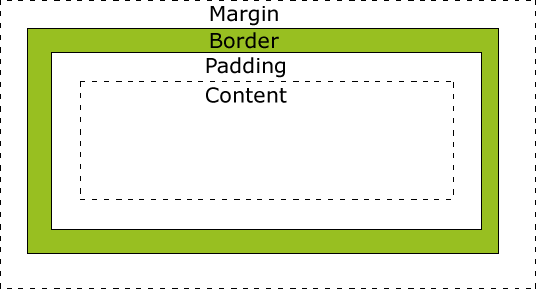
- Margin: space in between DOM elements
- Padding: space within the DOM element
- Border: the outline around the DOM Element.
In general, the width of a DOM element is padding + border + content.
-
Implications
The main implications of this has to do with building rows with multiple tags / items inside of it. The widths adding up to 100% isn’t enough – the width + padding + border + margin must add up to 100%!
-
Box Sizing
This is a useful tool. We can use box-sizing to force the padding to be pulled into our content width. This way, padding is not added to the overall width. Types: content-box, border-box
-